
2023.08.17
"METALVERSE ELEMENT (NFT)" is now available to be granted & Discord exclusive channels is open!!
We have started to grant NFT to customers who purchased "METALVERSE ELEMENT (NFT)" at "A!SMART" during the period of July 7, 2023 (Fri) - July 24, 2023 (Mon)!
※NFTs will be granted to "A Wallet" created with "A!-ID" registered for "A!SMART".
Please note that it may take some time for the NFTs to appear on your "A Wallet" since it will be granted sequentially.
Furthermore!!
"METALVERSE ELEMENT (NFT)" exclusive channels will be opened in “METALVERSE Discord” !!
■metalverse-element-chat
This is an exclusive channel for "METALVERSE ELEMENT (NFT)" holders to view and post.
You can enjoy the chat about METALVERSE there!
■livephoto
「METALVERSE#1 - UNBOXING」Live photo channel for a limited time.
<Live Photos Available Period>
18:00, September 7, 2023 (Thu) - 17:59, September 8, 2023 (Fri) *Tentative/ 24 hours limited
*The schedule is subject to change without notice.
※Please register your Discord account and link it to "A Wallet" early if you wish to view it.
We will not be able to support you after the viewing period. Kindly be aware of this beforehand.
【METALVERSE Discord】
How to join "METALVERSE ELEMENT (NFT)" exclusive channels
※The app is recommended when using Discord.
Proceed to STEP 2 if you already have an account.
Click here to read how to create.
※If you use a temporary account without email or phone number verification (you will no longer be able to log in again after logging out), "A Wallet" will be connected to your temporary account, and you will not be able to view the exclusive channels when you log in again.If you have connected to "A Wallet" with a temporary account, please go to the "A Wallet" management page to unlink, and then link them again with a Discord account that is not a temporary account.
<STEP2>Access "METALVERSE Discord" and link with "A Wallet".
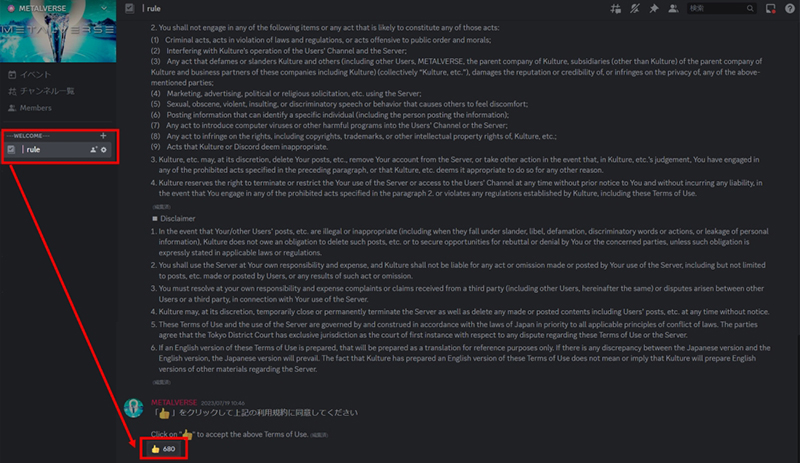
1. Access "METALVERSE Discord" and read the contents of the "rule" channel, then press the stamp of agreement. After the agreement, the "element-gate" channel will be available for viewing.
* "METALVERSE Discord" itself can be accessed by anyone, but the limited channels can be accessed only by those who hold "METALVERSE ELEMENT (NFT)".
2. Click on the URL in the "element-gate" channel that appears after agreement.
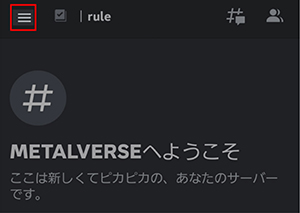
 ※For smartphone users, tap the hamburger menu in the upper left corner to see a list of channels.
3. Follow the instructions and link your Discord account with your "A Wallet" account.
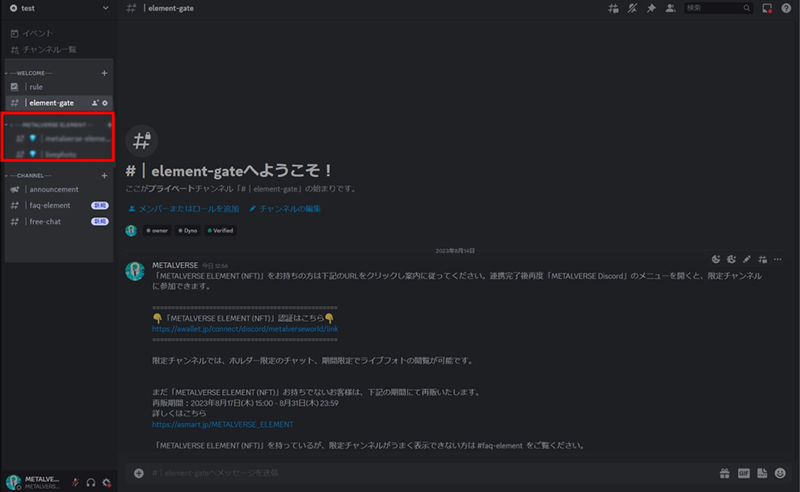
4.When you return to the channels list, a "METALVERSE Discord" limited channels will be available under "element-gate".
About "METALVERSE ELEMENT (NFT)" grant, how to join "METALVERSE Discord" limited channels.
▶FAQ(Discord will be opened)
▶Contact
Please note that the current "free-chat" will be closed at the end of August 2023, in conjunction with the opening of the "metalverse-element" limited channels. Please enjoy the chat on "metalverse-element-chat" in the future.
※NFTs will be granted to "A Wallet" created with "A!-ID" registered for "A!SMART".
Please note that it may take some time for the NFTs to appear on your "A Wallet" since it will be granted sequentially.
Furthermore!!
"METALVERSE ELEMENT (NFT)" exclusive channels will be opened in “METALVERSE Discord” !!
■metalverse-element-chat
This is an exclusive channel for "METALVERSE ELEMENT (NFT)" holders to view and post.
You can enjoy the chat about METALVERSE there!
■livephoto
「METALVERSE#1 - UNBOXING」Live photo channel for a limited time.
<Live Photos Available Period>
18:00, September 7, 2023 (Thu) - 17:59, September 8, 2023 (Fri) *Tentative/ 24 hours limited
*The schedule is subject to change without notice.
※Please register your Discord account and link it to "A Wallet" early if you wish to view it.
We will not be able to support you after the viewing period. Kindly be aware of this beforehand.
【METALVERSE Discord】
How to join "METALVERSE ELEMENT (NFT)" exclusive channels
<STEP1>Create a Discord account, then download the app. (*no registration or usage fees)
Create a Discord account. Verify email address and phone number.※The app is recommended when using Discord.
Proceed to STEP 2 if you already have an account.
Click here to read how to create.
※If you use a temporary account without email or phone number verification (you will no longer be able to log in again after logging out), "A Wallet" will be connected to your temporary account, and you will not be able to view the exclusive channels when you log in again.If you have connected to "A Wallet" with a temporary account, please go to the "A Wallet" management page to unlink, and then link them again with a Discord account that is not a temporary account.
<STEP2>Access "METALVERSE Discord" and link with "A Wallet".
1. Access "METALVERSE Discord" and read the contents of the "rule" channel, then press the stamp of agreement. After the agreement, the "element-gate" channel will be available for viewing.
* "METALVERSE Discord" itself can be accessed by anyone, but the limited channels can be accessed only by those who hold "METALVERSE ELEMENT (NFT)".
2. Click on the URL in the "element-gate" channel that appears after agreement.
※For smartphone users, tap the hamburger menu in the upper left corner to see a list of channels.3. Follow the instructions and link your Discord account with your "A Wallet" account.
4.When you return to the channels list, a "METALVERSE Discord" limited channels will be available under "element-gate".
About "METALVERSE ELEMENT (NFT)" grant, how to join "METALVERSE Discord" limited channels.
▶FAQ(Discord will be opened)
▶Contact
Please note that the current "free-chat" will be closed at the end of August 2023, in conjunction with the opening of the "metalverse-element" limited channels. Please enjoy the chat on "metalverse-element-chat" in the future.